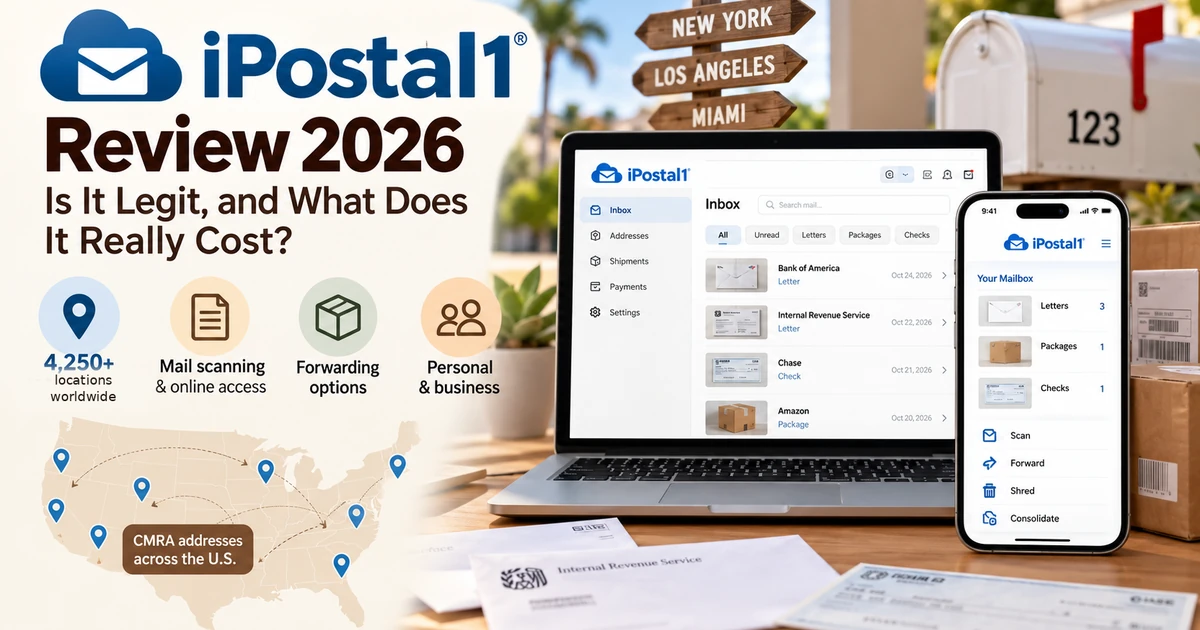
iPostal1 plans: personal or business?
Start with the mailbox type you need, then compare the exact address, plan allowance and optional fees.
Virtual Mailing Address
Published plans start at $9.99/month for eligible locations. This is not the same product as a business-name mailbox. Check the location class and monthly item allowance before checkout.
Virtual Business Address
Published plans start at $14.99/month for eligible locations. Use this category when mail arrives in a business name; verify recipient, authorization and any location-specific conditions.
How iPostal1 works
The real advantage of iPostal1 is address choice without giving up control of your mail. At U.S. locations, iPostal1 works with mail centers operating as Commercial Mail Receiving Agencies (CMRAs), under USPS rules for receiving mail on customers' behalf. This regulated framework, including identity checks and formal authorization, is a reassuring sign of seriousness, although it does not guarantee identical service quality at every location. Whether you're traveling, moving, living abroad or running a business from home, you can choose a suitable address and manage incoming items online. Instead of visiting the mail center, you decide what needs to be scanned, forwarded, stored, discarded or picked up. Here's how that works in practice.
Compare participating mail centers, select the address and plan that suit you, then complete the required identity verification before mail is accepted.
Read the full step ↓ See what has arrivedWhen an item reaches your location, an image of its envelope appears in your digital mailbox, letting you review incoming mail wherever you are.
Read the full step ↓ Tell the center what to doHave a letter opened and scanned, send originals to another address, arrange collection or dispose of unwanted mail. Options and fees vary by location.
Read the full step ↓Set up your address
With iPostal1, you are choosing a specific physical mail center as well as a digital mailbox. Start with the city or ZIP code you want, then look beyond the advertised monthly price. The address category, local pickup convenience, handling of packages and availability of services such as international forwarding may matter more than a small difference in subscription cost.
Next, select a plan that matches who will receive the mail. A Virtual Mailing Address may suit personal correspondence; a Virtual Business Address is designed for business-name mail. Check the permitted recipient names, monthly incoming-item allowance and any location-specific conditions before paying. A street-style mailbox address is not automatically an acceptable residential address, registered office or Registered Agent address.
For U.S. locations, setup involves identity verification and USPS Form 1583, which authorizes the mail center to receive mail for you. Follow the identification and notarization instructions provided during signup. Once the account is ready, use the exact mailing format and mailbox number supplied by iPostal1 when giving the new address to senders.
Check before subscribing: the exact address, recipient eligibility, pickup availability and the fees attached to that particular mail center.
See what has arrived
Incoming letters and parcels first reach the physical location you selected. The mail center records each received item so it can appear in your Digital Mailbox on the iPostal1 website or mobile app. You can check your inbox from home, while traveling or from another country, without needing to visit the center to find out what has arrived.
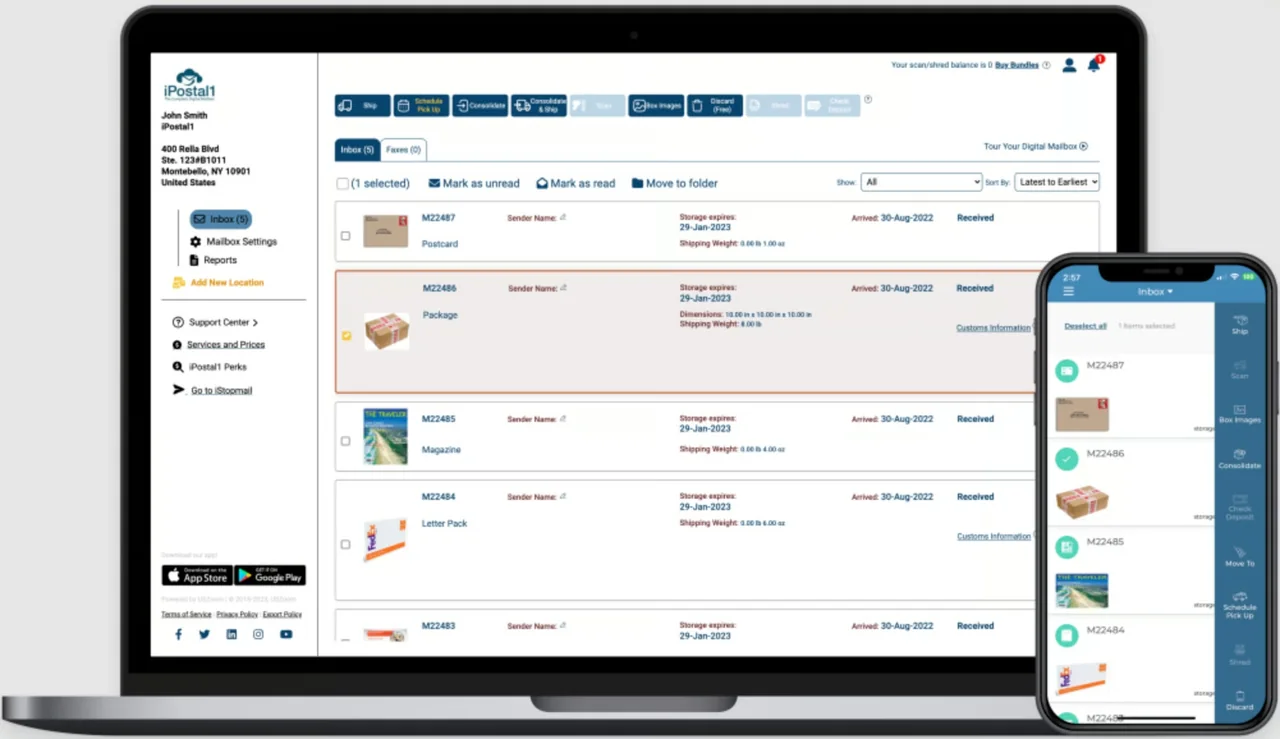
The important distinction is between seeing an envelope and reading the letter inside. The dashboard normally shows an exterior image and item information; that does not mean the contents have already been opened or digitized. If you need to read a document remotely, you request a separate content scan. On entry-level plans, that action can carry an additional charge. Packages also count as incoming items under the provider's published definition.
For example, if a letter arrives while you are overseas, you can review its outside image, decide whether it needs a scan, and leave the physical original at the center until you choose what to do next. Notification and processing times depend on the receiving location; do not assume every item will appear instantly.
Watch the allowance: compare your expected monthly letters and parcels with the plan's incoming-item limit, then check scan and overage prices.
Tell the center what to do
Your digital inbox is a control panel for physical mail, not merely a place to store envelope pictures. For each eligible item, you can submit an instruction to the local mail center: open and scan a letter so you can read its contents, forward the original to another address, arrange an in-person pickup, or ask for unwanted mail to be discarded or shredded. The available choices depend on the center and the item.
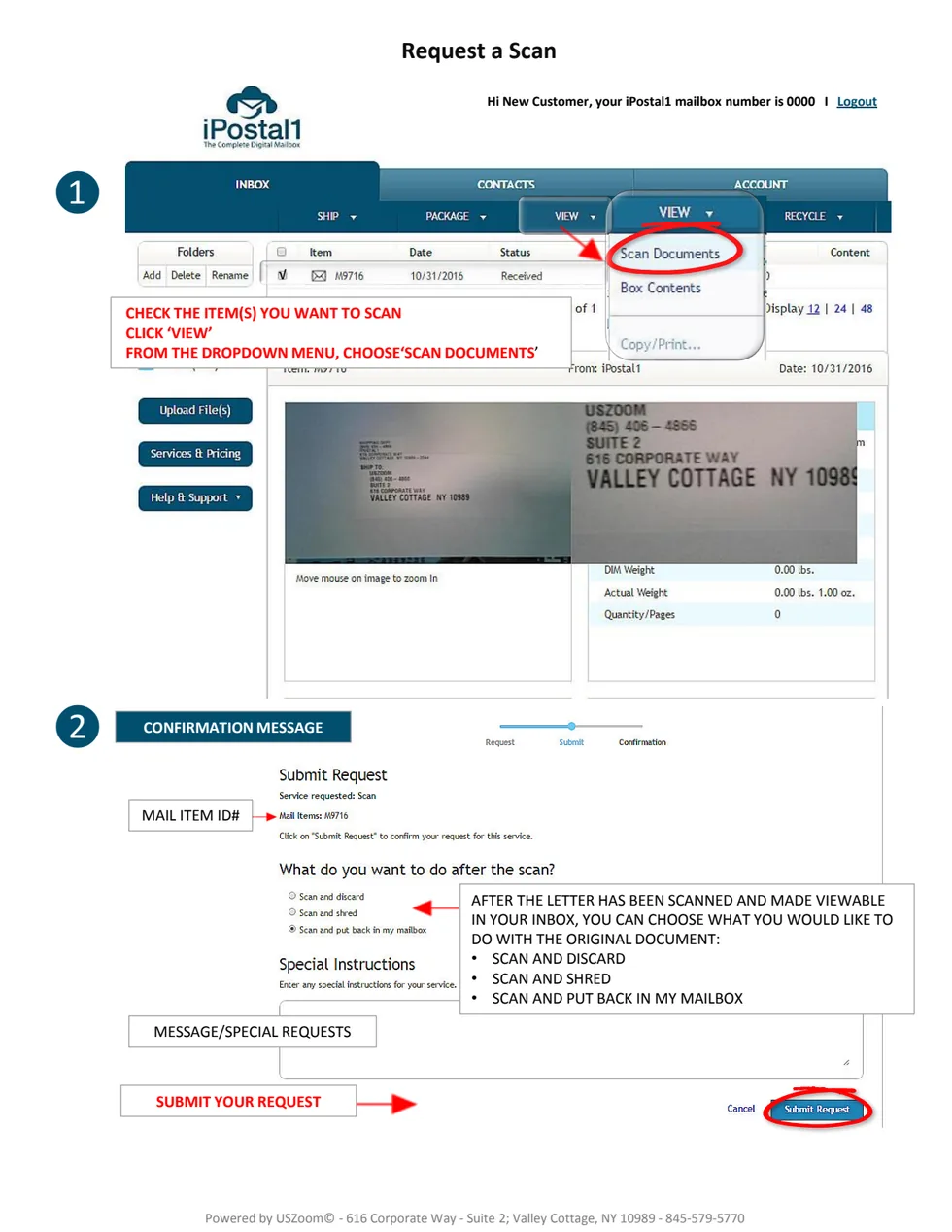
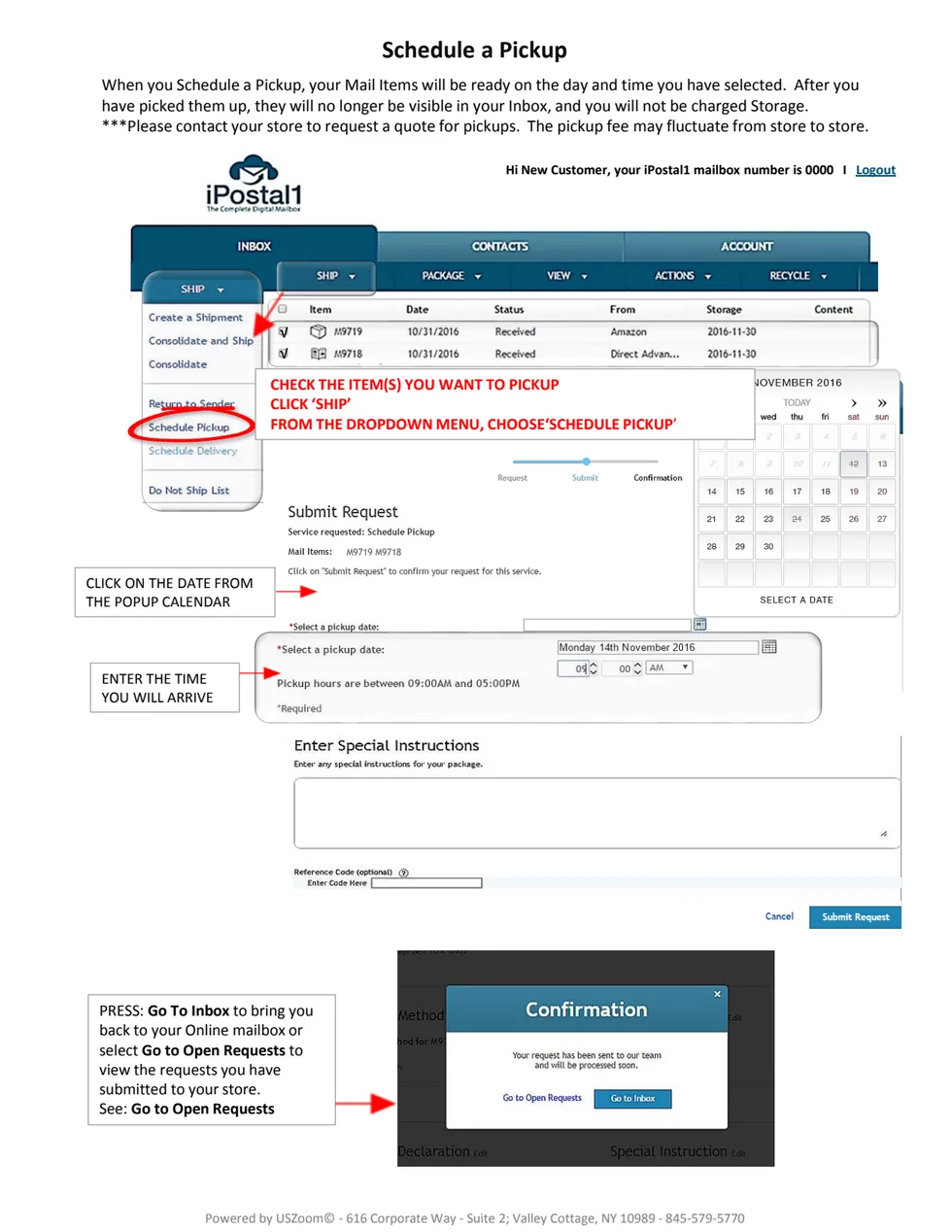
These actions have different practical consequences. A content scan is useful when you need information quickly but do not yet need the paper original. Forwarding is better when you need the physical document or parcel; postage, carrier service and any handling charges are calculated separately. Pickup can make sense if you live near the selected center, while disposal should be requested only when you are certain the original is no longer needed.
Before relying on a workflow, check which options your exact location offers, whether international destinations are supported, and how long uncollected mail can remain in storage. The iPostal1 app or website sends the request; the local operator performs the physical work. For more on shipping and charges, see our mail forwarding guide.
Think in real costs: a low monthly subscription can be economical for occasional scans, but frequent forwarding or extra handling may change the total.
Who should choose iPostal1?
iPostal1 is a strong fit if you want a mailing address in a particular city without having to visit it every time mail arrives. Its wide address network is especially useful when location matters as much as remote access: you can choose a receiving center that suits your circumstances and manage everyday correspondence from your digital inbox.
Travelers, frequent movers and people living abroad can keep a consistent point of contact while their physical address changes. They can check incoming envelopes online, request a scan when a letter is urgent and have an original forwarded only when necessary. For someone who receives relatively little mail, paying for occasional extra services may be more practical than committing to a scan-heavy plan.
Freelancers, home-based professionals and small businesses may appreciate a separate address for business correspondence, particularly when they need a presence in a specific market. If mail will arrive in a company name, choose the appropriate business plan and confirm recipient rules at the selected center. A virtual mailbox does not automatically qualify as a registered office or Registered Agent address; these are different functions, explained in our LLC address guide.
What I particularly appreciate about iPostal1 is how easily it adapts to different needs and situations. Its Digital Mailbox is well designed, making it simple to manage physical mail online from a computer or tablet. I also like the flexibility of its pricing: you can choose a plan that suits your mail volume and add services such as scans or forwarding when you need them, rather than paying for a rigid package of features you may rarely use. Of course, the cost of these options depends on the selected location and service. Use the MailboxScout Real Cost Calculator to model your own usage.
From Reddit · Independent discussions
What Reddit users say about iPostal1
A few comments from public Reddit discussions, including positive and critical experiences. These claims are not independently verified and do not influence the MailboxScout editorial score.
“i've been using them without issue for over a year now.”
“Service definitely depends on location.”
“I have had nothing but trouble setting up a mail service with iPostal1.”
Short excerpts selected November 24, 2026. Linked discussions may change or be deleted. These are individual online comments, not verified customer reviews or a representative sample.
Have you actually used iPostal1? Share your experience about onboarding, scans, forwarding, real costs or local mail-center service.
The MailboxScout User Reviews section accepts firsthand experiences, both positive and negative, after moderation for spam and personal information.
iPostal1 at a glance
The base subscription pays for your address and digital mailbox, but scans, excess mail items, shipments and other optional services can cost extra. The prices below are published U.S. starting rates at eligible Standard locations, not nationwide quotes.
1. Personal and business mailbox plans
| Mailbox / plan | Monthly from | Mail items / month | Annual upfront from |
|---|---|---|---|
| Personal · Green | $9.99 | 30 | $99 |
| Personal · Blue | $14.99 | 60 | $149 |
| Personal · Silver | $24.99 | 120 | $249 |
| Personal · Gold | $39.99 | 240 | $399 |
| Business · Green | $14.99 | 30 | $149 |
| Business · Blue | $19.99 | 60 | $199 |
| Business · Silver | $29.99 | 120 | $299 |
| Business · Gold | $44.99 | 240 | $449 |
Important: Personal plans permit up to six individual recipients but not a company name. Business plans permit one company name plus up to six recipients. Annual billing is prepaid and generally lowers the subscription cost; rates vary by address tier. The Digital Mailbox is available on the web and mobile app, with a network of 4,250+ worldwide. Payment methods include Visa, Mastercard, American Express, Discover and PayPal (payment FAQ).
2. Additional fees and optional services
| Extra received mail | $0.35 per item above the plan's monthly allowance. |
|---|---|
| Open & Scan or shred | $2.25 per single-envelope order, up to 10 pages; $0.25 for an additional scanned page under the published single-order schedule. |
| Prepaid scan / shred bundles | $10 for 5 orders, $18 for 10, or $30 for 20. Prepaid, non-refundable, with no time limit; bundle terms and page limits apply. |
| Mail and package forwarding | Live quote when ordering, based on the selected mail center, carrier, service and destination. There is no universal fixed forwarding price; international forwarding is not available everywhere. |
| Local pickup | Available at participating locations; some centers charge an additional fee. Verify the chosen address. |
| Mail storage beyond free period | 30 days included for letters; afterward $1.10 per letter / large envelope / magazine / postcard per month. |
| Package storage beyond free period | Depending on package size, 5–30 days included. Afterward, published charges start at $1.10 per pound per month for smaller parcels; larger packages can be billed per 10 or 5 days, using actual or dimensional weight. |
| Consolidation | Letters consolidated without charge; $1.95 per package or letter-pack consolidated. Packaging materials may be extra. |
| Check deposit | $4.95 for up to five checks, plus check scans and trackable postage; U.S. locations only. |
| Photos of package contents | Invoice photo $2.95; contents $3.95; both $5.95 (up to six images). |
| Registered Agent add-on | $99/year with an eligible business plan, where offered. |
3. Three illustrative monthly costs (before postage and local surcharges)
| Usage example | Assumed charges | Illustrative total |
|---|---|---|
| Light personal use | Personal Green $9.99 + three individual content scans (3 × $2.25). | $16.74 |
| Regular scanning + forwarding | Personal Blue $14.99 + five individual content scans (5 × $2.25) + one requested shipment. | $26.24 + forwarding quote |
| Small business, extra mail volume | Business Green $14.99 + eight content scans ($18) + ten mail items above its 30-item allowance ($3.50). | $36.49 |
Examples use eligible U.S. base-rate monthly subscriptions and single scan orders of up to 10 pages, with no prepaid bundles. They are illustrations, not personalized quotes. Taxes, higher-tier address surcharges, additional pages, storage, pickup, packaging and shipping are excluded. The forwarding quote in the second example must be obtained at the selected location.
Rates and optional fees: official personal pricing and official business pricing, consulted November 25, 2026. Optional-services charges listed here are U.S. rates and may not apply to Canadian mailbox locations. For a customized estimate, use the MailboxScout Real Cost Calculator.
iPostal1 customer support: platform help vs. local mail center
How to contact iPostal1: its official contact page lists +1 845-579-5770 and live chat, both advertised Monday–Friday, 9 AM–8 PM ET. Existing subscribers can also use the customer contact form to submit an issue for follow-up during business hours.
Two levels of responsibility: iPostal1 operates the digital platform and central customer-support channels, but the selected mail-center partner physically receives, scans, stores and forwards the mail. A complaint about the website or billing is not the same as a missing envelope or a delayed scan at a particular store. Before signing up, check the local center's opening hours and contact arrangements, especially if you expect urgent scans or frequent pickups.
MailboxScout's assessment: phone, chat and written contact-form access offer several ways to raise a problem, but the published central hours do not cover weekends. Service quality can also depend on the chosen location; contact availability alone does not prove resolution speed. For time-sensitive correspondence, confirm how central support coordinates with your specific mail center.
iPostal1 pros and cons
Advantages
- 4,250+ mailbox locations
- Personal, business and virtual office plans
- Mobile apps and broad feature set
- Registered agent add-on in selected states
- Selective forwarding: Forward only the items you need, with carrier options visible during the request.
Limitations
- Scanning is an extra cost on basic mailbox plans
- Pricing and pickup policies vary by location
- International forwarding is not available at every location
iPostal1 alternatives: which competing service fits better?
It is worth comparing competitors when the address, scanning pattern, forwarding rules or overall bill does not fit your needs. Here are three options to research, each for a different reason — not interchangeable recommendations:
- Traveling Mailbox — More predictable scan allowances rather than paying for each scan request.
- PostScan Mail — An alternative address network with documented tier-based allowances.
- VirtualPostMail — Business-centric check and document workflows, with a more limited address selection.
Compare the total, not just the advertised monthly fee. Check the exact address, scanned pages, additional recipients, holding periods, outgoing handling charges and postage. Confirm service availability at the selected location before switching.
For an in-depth comparison of competing services, read our iPostal1 alternatives guide.
MailboxScout verdict
9.1 / 10iPostal1 stands out for its exceptional choice of mailing addresses. Its extensive network, separate personal and business plans, and Digital Mailbox make it practical to manage correspondence remotely. The $9.99 starting price can be appealing for light use, but scans, forwarding, storage and local handling can increase the final bill. Check the specific address, authorized recipients and whether a CMRA mailbox is suitable for your intended purpose.
Why this score? Our editorial rating places particular weight on iPostal1's exceptional address selection, flexible plans and accessible mail-management tools. We also account for pay-per-use content scanning, differences in fees and pickup policies between locations, and the fact that not every center supports international forwarding. Its central phone, chat and contact-form support is useful, but mail-processing issues may depend on the chosen local partner, and the published central hours do not cover weekends.
This is MailboxScout's independent editorial assessment, separate from Trustpilot customer ratings. See our editorial methodology.
iPostal1 review FAQ
Is iPostal1 legit?
Yes — iPostal1 is an established virtual-mailbox company, not simply a directory of addresses. According to the provider, it was founded in 2015 and connects its digital-mailbox platform to more than 4,250 staffed mail-center locations. Customers select a physical address, complete identity verification and manage incoming mail online. In the U.S., its participating mail centers operate as Commercial Mail Receiving Agencies (CMRAs), subject to USPS requirements. This is a real, structured mail-receiving service, but it does not guarantee identical service at every location or mean that every address will be accepted for banking, residential or other legal purposes. See our CMRA guide for the distinction.
How much does iPostal1 cost per month?
Personal mailbox plans start at $9.99/month at eligible Standard addresses. Business plans start at a higher price. Your final bill can include content scans, shipping and location-specific extras.
What payment methods does iPostal1 accept?
iPostal1 accepts Visa, Mastercard, American Express and Discover credit cards, plus PayPal. The subscription is charged at checkout and automatically renews on the selected billing cycle unless cancelled before the next billing date. Importantly, charges and renewal can continue even if USPS Form 1583 has not yet been completed. See the official payment and billing FAQ.
Does iPostal1 include mail scanning?
Images of the outside of mail items are generally included within plan limits. Opening a letter and scanning its contents is a separate, paid service on entry-level plans.
Can I use iPostal1 for my LLC or as a residential address?
It offers business-address plans and a separate Registered Agent service in selected states. But an ordinary CMRA mailbox is not automatically a residential address, principal office or legally suitable Registered Agent address. Verify the exact intended use.
Can iPostal1 forward mail internationally?
International forwarding is available at some locations, not all. Confirm the selected location, destination, shipping options and full charges before paying.
Is iPostal1 better than Traveling Mailbox?
iPostal1 may appeal more if address choice is the priority. Traveling Mailbox can be more attractive if bundled page scans and a published forwarding-handling structure better match your usage. There is no universal winner.